Skip to content

Before you start

  • A card: you are charged the day you subscribe, even during your first 30 days, which then end.
  • Who uses Calenspot: just you (Pro) or a team of up to 20 people (Teams).

Step 1: Open your subscription

Your plan and its limits are in one place.

  1. In a wide window, select Settings, then Subscription.

  2. On a phone or a narrow window, open Account, then Settings and Subscription.

Done when: you see your current plan and its Plan limits.

Subscription on the Free plan: the current plan, Change plan and the plan limits

Illustrative demo data: Studio Lumière is a sample business.

Step 2: Choose a plan and how often you pay

Pro is for one person; Teams is for a team.

  1. Select Change plan.

  2. Pick Monthly or Yearly: a year costs less than twelve months.

  3. Pro is for one professional; Teams is for up to 20 people.

Done when: the plan cards show the prices you want to pay.

Step 3: Choose your plan

Subscribing ends your first 30 days with everything included and starts your paid plan.

  1. On the plan you want, select its button. With Yearly, you pay for the whole year.

  2. The subscription starts straight away and the first payment is taken then.

Done when: a secure payment page opens.

Heads-up

You are charged on the day you subscribe. You can cancel any time.
Choose a plan on the Free plan: monthly or yearly, Pro and Teams with their prices and subscribe buttons

Step 4: Pay on the secure page

You enter the card on Stripe’s secure page, not in Calenspot.

  1. Your e-mail is already filled in. Enter your card and its billing address.

  2. Prices include all taxes. The page shows what you pay today.

  3. Confirm there. The page takes you back to Calenspot.

Done when: you are back in Calenspot.

Step 5: Wait for the confirmation

Calenspot confirms your new plan, usually within a minute.

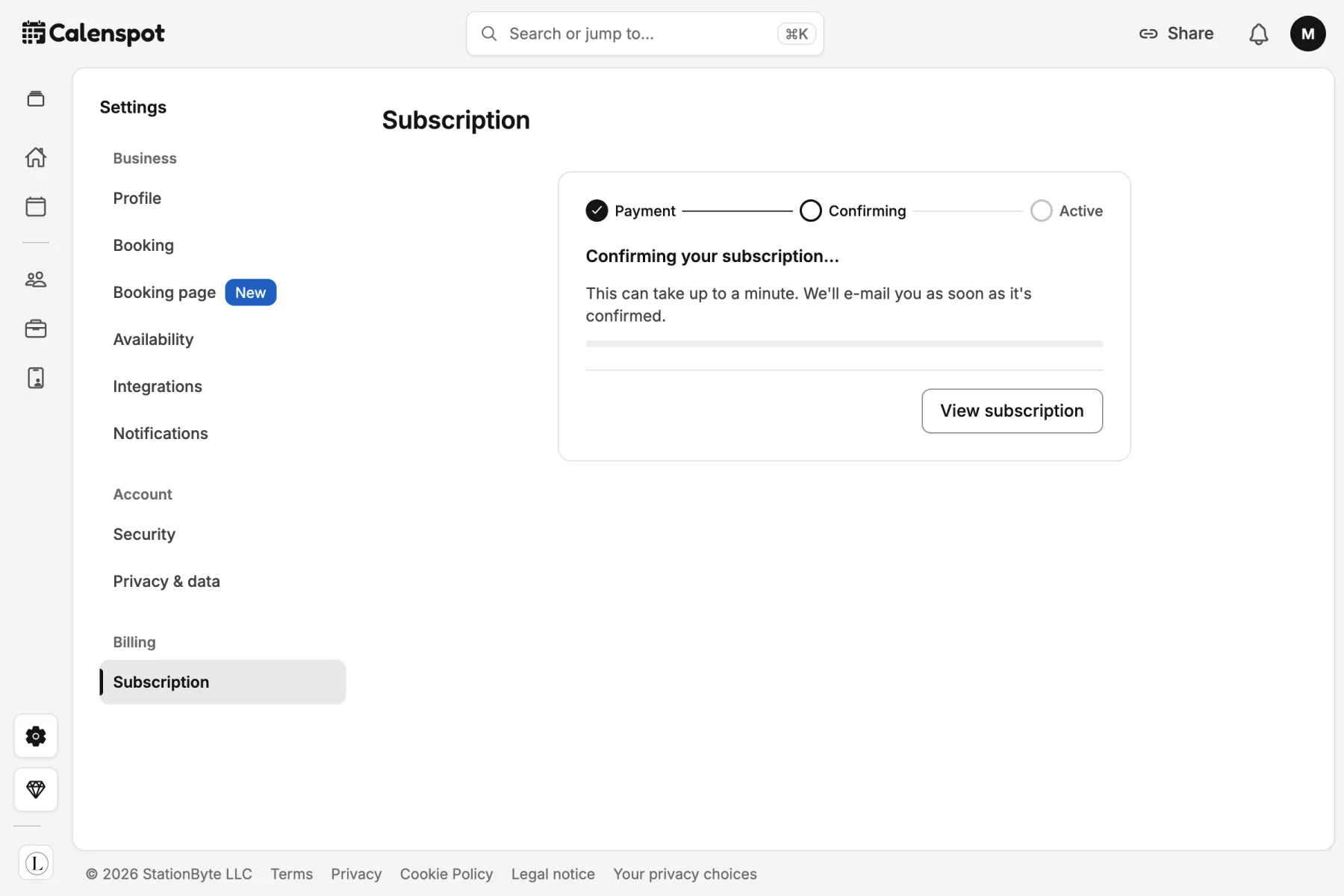
  1. The panel moves from Payment to Confirming to Active.

  2. Stay on this page until it shows Active, or select View subscription to check later. You also get an e-mail once it is confirmed.

Done when: your new plan shows.

Step 6: Check your plan, card and invoices

Everything about your plan stays in one place.

  1. Your plan shows its price and the day of the next charge.

  2. Payment method shows your card; Invoices lists each payment, the first on the day you subscribed.

  3. Later, select Change plan to switch plan or how often you pay, or Cancel plan to stop.

Done when: your plan, card and next charge look right.

Subscription after upgrading: Pro with its next charge date, the saved card and the first invoice, paid

If something looks different

  • You don’t see Change plan.

    Likely cause
    Only the owner and admins can change the plan.
    What to do
    Ask the owner or an admin of the business.
  • The plan button takes payment straight away.

    Likely cause
    That is expected: Pro and Teams are charged from the day you subscribe, even during your first 30 days, which then end.
    What to do
    The plan starts when you pay, and you can cancel it from Subscription at any time.
  • It still says Confirming after a minute.

    Likely cause
    The payment is still being confirmed.
    What to do
    Open Subscription again in a moment. You get an e-mail once it is confirmed.
  • Your business is already on Pro and you want Teams.

    Likely cause
    This is a plan change, not a new subscription.
    What to do
    Select Change plan, then Upgrade to Teams, and check the review: Due today is a prorated amount for the rest of the current period, paid when you confirm.
Was this guide helpful?

Found a mistake? Report an error

FAQ

Plan and billing questions

Is there a free trial?

Every new account starts with 30 days with everything included, no card needed. When they end, it moves to Free unless you subscribe; Pro and Teams are charged from the day you subscribe.

Can I change or cancel later?

Yes, from your subscription page: switch plan or how often you pay, or cancel.

What does each plan cost?

Pro costs $ 5,900 a month or $ 59,000 a year; Teams costs $ 12,900 a month or $ 129,000 a year. Prices include all taxes.

Start free, upgrade when you grow

Create your account on Free and move to Pro or Teams from the app.

  • Free plan, no card
  • 30 days with everything included, no card
  • No commission